How I Make Video Game Cross Stitch Patterns…
I’d say I pretty much get asked daily how I make my patterns…so here is a tutorial of how I do it, with some options in case you don’t want to buy a program. I made a Dig Dug Pattern as an example…
1st - Get the sprites
a) download them from a site - I prefer The Shyguy Kingdom or The Spriters Resource.
b) fire up an emulator like MAME or FCEU, download a rom, run your game, take a screenshot.
2nd - Arrange the sprites
a) I use photoshop to arrange the sprites how I want them, a free option is GIMP. ![]()
(enlarged, you use the small image)
3rd - Make the Pattern
a) I use PCStitch, but its not free.
b) Dark Lilac is a free website you can convert your pattern on (ive used it a few times and am not always happy with the floss choices)
c) RGB to DMC chart - If you know the RGB values of the colors here is an easy conversion chart.
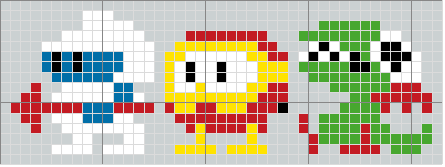
DMC colors: 310, 5200, 995, 973, 817, 702
4th - Tips…
a) The chosen colors arent always right, dont be afraid to buy something different when you get to the store.
b) If you feel a color is a little off (most often skin tones), try a few different conversion programs (they’ll each give you a different color), write them all down, and choose at the store what looks the best.
c) I’ve also been at the store and said to myself “there is no way this is the right color”, but bought it anyway and once you start stitching, its perfect. so maybe just buy all the colors that seem right and test them out, It’ll probably only run you an extra $1 anyway.
I think that is about it! Let me know if there are any questions about this so I can update it.
edit: also…If you make any patterns make sure you email them to me so I can post them!

March 27th, 2008 at 9:42 am
This is rad, thanks for sharing this. I’m going to venture into making some cool stuff.
March 27th, 2008 at 3:10 pm
Thank you very much! I’ll be starting with some King’s Quest I, some OLD pixelly goodness, heck, it’s Pre-NES even, lol! But over time I’ll move up the series and thusly the bits will go from 8bit to better.
Heck, I’m going to play with some Perler beads with these, as they are simple enough for that. I know there’s a different brand of Perler-type beads (beads that you iron w/protective paper between the iron and beads that have been arranged in a design on a pegged board) that has a half size of, that I’ve seen video-gamer jewelry of on Etsy) and while I wouldn’t wear Perler beads as jewelry, too dorky/childish, if small enough in the half-size beads, I’d wear a design in those.
Or, I could always peyote, brick, or square stitch a pendant, bracelete, or what have you . . . hrm. Lots of ideas!
Thanks for inspiring me - perhaps if there’s a craft I do that you don’t, like I do the bead-weaving/stitching, we could exchange something sometime!
March 27th, 2008 at 3:11 pm
I forgot to mention - I’m so multi-craftual, I even WEAVE - I was thinking of weaving a Graham motif (from King’s Quest 1) into an inkle-woven band. Now THAT’s a really far stretch from technology to ancient-style weaving!!!
March 27th, 2008 at 5:06 pm
sara - awesome. I have no idea what weaving really looks like, but Id love to see a new craft, and Kings quest is an awesome series. Im more of a fan of police quest but they were both great.
March 27th, 2008 at 8:30 pm
Good tips. In addition to Dark Lilac, I use a free program just called “Stitch.” It has a few useful editing features, but I mostly use it to choose floss colors.
It’s available here: http://people.dsv.su.se/~henrikbe/stitch/
March 28th, 2008 at 6:53 am
jeff - cool, Ill check out that program. I dont think you can ever have too many floss choosers…
March 28th, 2008 at 4:13 pm
If you don’t use pcstitch you can also easily just print a larger version of the sprite, because they’re all pixelized anyway! That’s what I do.
March 28th, 2008 at 5:05 pm
sassy - yeah, I dont use pcstitch for pixelized versions…I use it for the floss color selection. thats really the only reason why its a useful program.
March 28th, 2008 at 10:44 pm
That’s awesome, thanks for sharing that.
April 1st, 2008 at 12:43 pm
[…] Stitch shows you how to make video game cross stitch patterns in this simple […]
June 3rd, 2008 at 1:14 pm
I’ve been trying to find out how to convert pixel art directly into machine embroidery design files. So far no luck.
One method I tried was to trace the bitmap in Macromedia Flash MX 2004 and convert the resulting vector graphic squares into fills for the embroidery machine to follow but the pull effect was so bad it didn’t look right at all.
Seems obvious that if you’re going to build a machine that can cross stitch, and you’re giving the program that runs it the ability to import images (The place I work for uses Melco embroidery systems) it would seem obvious to give you the option to turn each pixel into a cross stitch square. Instead they have this complex algorithm that’s designed for converting photographs to cross stitches, and you have to either work through that or trace everything by hand.
June 3rd, 2008 at 2:01 pm
sorry dont know much about machine embroidery…does sound dumb though
July 25th, 2008 at 9:05 am
OMG I luv the DigDug design, so cute! Thanks for the great idea.
January 27th, 2009 at 4:22 pm
[…] artwork yourself of old NES games or any other images you wish, you can check out the tutorial at SpriteStitch for stitch art or actually make Lego Pixel Art as […]
May 24th, 2009 at 9:03 am
[…] How I Make Video Game Cross Stitch Patterns… — Sprite Stitch (tags: crafts embroidery howto games geek tutorial) […]
June 4th, 2009 at 3:07 pm
[…] the Geek Craft pool, and an introduction to the SpriteStitch blog and forums. There, I discovered instructions on how to cross-stitch my very own video game images. After much debate and deliberation, I chose […]
February 23rd, 2010 at 10:27 am
[…] in classic video games. They’d make great little needlepoint. Sure enough, someone has a tutorial on how to make your […]
March 19th, 2010 at 10:22 am
Hey, darklilac is down, but if you know of another free option that would be amazing!
March 31st, 2010 at 12:15 pm
Goodmorning
Good post - i’m creating video about it and i will post it to youtube !
if you wana to help or just need a link send me email !
July 5th, 2010 at 8:52 am
thanks, awesome information.